Code Generation And Manipulation Using T4 Templates And Visual Studio Automation By Sample
 Photo by Masood Aslami on Pexels
Introduction
The goal of this exercise is to generate a class that inherits from System.Data.Entity.DbContext. It will contain properties of type System.Data.Entity.DbSet for each class that is already contained in the project. Also, the script will examine these classes for a property called “Id” and, if it doesn’t exist, add it.
Now you could argue that the manipulation of project items is not exactly what you would want to do in a T4 template. As a matter of fact, you would normally do this in a Visual Studio Extension. But for the sake of simplicity, I will demonstrate this in a T4 template since the code is almost the same.
Setting Up
So let’s get it on…. consider the initial project structure in the image below. In the folder “Data Classes” I have a couple of classes that I would like to store in a data base. For that, I need a DbContext class that holds all these classes as properties.
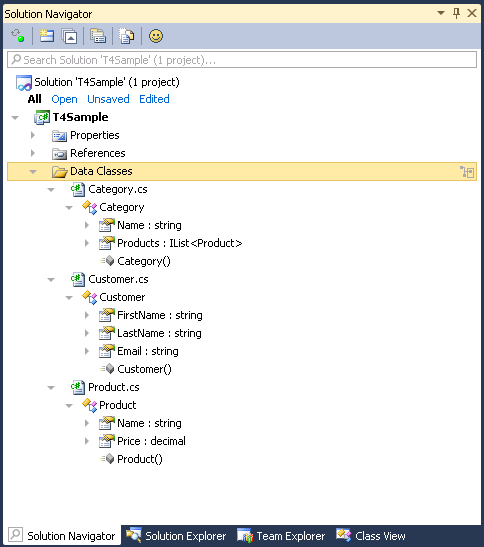
That DbContext class should look like this:
class DataStore : DbContext
{
    public DbSet<Customer> Customers { get; set; }
    public DbSet<Product> Products { get; set; }
    public DbSet<Category> Categories { get; set; }
}
Of course, we programmers are terribly lazy, so why would I want to code that by hand? Also, in real-world projects we typically have lots and lots of data classes. So I’ll create a T4 template (“Add New Item”->”Text Template”) that generates this code for me and call it DataStore.tt. Because I know that I’ll be using Visual Studio automation, I’ll add assembly references to envdte.dll and envdte80.dll. For the Entity Framework classes DbContext and DbSet<> I’ll add references to System.Data.Entity.dll and EntityFramework.dll.
My naked tt file looks like this:
<#@ template debug="true" hostspecific="true" language="C#" #>
<#@ assembly name="envdte" #>
<#@ assembly name="envdte80" #>
<#@ assembly name="System.Core.dll" #>
<#@ import namespace="System.Linq" #>
<#@ import namespace="System.Collections.Generic" #>
<#@ import namespace="System.IO" #>
<#@ output extension=".cs" #>
//------------------------------------------------------------------------------
//
// This code was generated from a template.
//
// Manual changes to this file may cause unexpected behavior in your application.
// Manual changes to this file will be overwritten if the code is regenerated.
//
//------------------------------------------------------------------------------
Please note the hostspecific attribute. This attribute must be set to true so that the class that resembles the text template will contain a property called Host which returns an IServiceProvider object that allows us to access Visual Studio.
So now that we’ve got everything set up, these are the steps the T4 template will need to do:
- Locate all affected classes
- Find a property named “Id”
- If no Id property is found, create it
- Generate the DbContext class and its properties
Before we can do that, we must get access to Visual Studio. The class that resembles the text template itself gets generated in the AppData folder of the user. It inherits Microsoft.VisualStudio.TextTemplating.TextTransformation. If the hostspecific attribute is set to “true” as stated above, a property called “Host” is generated into the text template class. The value of the Host property can be casted to IServiceProvider. This interface allows us to query Visual Studio for all sorts of services we need. The service we’re interested in here is EnvDTE.DTE (although the name does not look like it, this is an interface). The interface DTE is “the top-level object in the Visual Studio automation object model” and allows us to access our projects and project items.
var serviceProvider = (IServiceProvider)this.Host;
var dte = (EnvDTE.DTE)serviceProvider.GetService(typeof(EnvDTE.DTE));
Now that we’ve got our DTE, we can go on and execute each of the steps we’ve defined above.
Note: all code I’m showing here is in fact inside the tt file. I’ll put all following methods in so-called “class feature control blocks”. Please refer to this article on MSDN for details.
Locate Affected Classes
At first, I need some methods to iterate the project items in search of classes. The classes I’m interested in are all inside the folder “Data Classes” and I want to restrict the search to that folder. I’ll start with defining two methods that search for that folder:
EnvDTE.ProjectItem GetProjectItem(EnvDTE.DTE dte, string relativePath)
{
    var projectDir = Path.GetDirectoryName(dte.ActiveDocument.ProjectItem.ContainingProject.FileName);
    var path = projectDir + "\\" + relativePath + "\\";

    return GetProjectItem(dte.ActiveDocument.ProjectItem.ContainingProject.ProjectItems, path);
}

EnvDTE.ProjectItem GetProjectItem(EnvDTE.ProjectItems projectItems, string absolutePath)
{
    foreach(EnvDTE.ProjectItem item in projectItems)
    {
        if(item.FileNames[0].Equals(absolutePath, StringComparison.OrdinalIgnoreCase)) return item;

        var result = GetProjectItem(item.ProjectItems, absolutePath);

        if(result != null) return result;
    }

    return null;
}
The first method is called like this:
var item = GetProjectItem(dte, "Data Classes");
In the first overload, we’ll get the file name otf the currently active document (i.e. the t4 template) and extract its directory path. Then we add the relative path we’re interested in (here: “Data Classes”). Now we have the absolute path of the folder we’Re interested in.
The second overload then iterates each item in the current project. A project item may be a file or a folder in the project. The type EnvDTE.ProjectItem contains a property FileNames which contains the absolute path of the item. We just compare it to the path we’re searching for and in case of success return the project item. Otherwise, we continue by iterating the item’s child items until we’ve found what we’re looking for.
So now that we’ve got the project item that represents the folder “Data Classes”, we must iterate the classes defined within it. Let’s look at the method for that:
IEnumerable<EnvDTE.CodeType> GetDefinedTypes(EnvDTE.DTE dte, string path)
{
    var item = GetProjectItem(dte, path);

    return from projectItem in item.ProjectItems.OfType<EnvDTE.ProjectItem>()
           where projectItem.FileCodeModel != null && projectItem.FileCodeModel.CodeElements != null
           from nameSpace in projectItem.FileCodeModel.CodeElements.OfType<EnvDTE.CodeNamespace>()
           from type in nameSpace.Members.OfType<EnvDTE.CodeType>()
           where type.Kind != EnvDTE.vsCMElement.vsCMElementEnum
           select type;
}
I’ll just go through each step and explain what it does.
GetProjectItem(dte, path)gets the folder “Data Classes”item.ProjectItemsgets all child project items of the folder …- the first
whereclause keeps only those that are code files and actually contain code (i.e. not just empty code files) - the first
from … OfType<CodeNamespace>gets all namespace elements from the files - the next
from … OfType<CodeType>gets all types defined in the namespace elements … - the last
whereclause drops the ones that are enumerations
Of course, we could restrict the returned types even more, for example to not return interfaces or delegates. But for the sake of simplicity, let’s assume that we only have classes and enums in our project.
Find A Property “Id”
Now we need to get the Id property. Actually, this is quite easy (it is just the first two statements of the method below), so I’ll something more complex. Lets assume that the property we’re looking for does not need to be called “Id”, but that instead we can identify it if it has the attribute System.Xml.Serialization.XmlElementAttribute applied with the Order property set to zero (
[XmlElement(Order=0)]
).
EnvDTE.CodeProperty GetKeyProperty(EnvDTE.CodeType type)
{
    var properties = type.Members.OfType<EnvDTE.CodeProperty>().ToList();
    var idProp = properties.FirstOrDefault(p => p.Name.Equals("id", StringComparison.OrdinalIgnoreCase));
    if(idProp != null) return idProp;

    foreach(var prop in properties)
    {
        var attr2 = prop.Attributes.OfType<EnvDTE.CodeAttribute>().FirstOrDefault(a => a.Name == "System.Xml.Serialization.XmlElementAttribute");
        if(attr2 == null) continue;

        var order = attr2.Children.OfType<EnvDTE80.CodeAttributeArgument>().FirstOrDefault(a => a.Name == "Order");
        if(order == null || order.Value != "0") continue;

        switch(prop.Type.TypeKind)
        {
            case EnvDTE.vsCMTypeRef.vsCMTypeRefOther:
            case EnvDTE.vsCMTypeRef.vsCMTypeRefCodeType:
            case EnvDTE.vsCMTypeRef.vsCMTypeRefArray:
            case EnvDTE.vsCMTypeRef.vsCMTypeRefVoid:
            case EnvDTE.vsCMTypeRef.vsCMTypeRefPointer:
            case EnvDTE.vsCMTypeRef.vsCMTypeRefObject:
            case EnvDTE.vsCMTypeRef.vsCMTypeRefVariant:
                continue;
        }

        return prop;
    }

    return null;
}
Now let’s go throw each step in the method above and explain it:
type.Members.OfType<CodeProperty>()gets all properties of the type.- The first
FirstOrDefaultfinds the property named “id” (case-insensitive comparison) - If that property exists, return it and exit the method
- The
foreachloop iterates each property prop.Attributesis queried for an attribute named “System.Xml.Serialization.XmlElementAttribute”- If the attribute does not exist, continue with next property
attr2.Childrenis queried for the property “Order” on that attribute- If the property “Order” does not exist or if its value is not “0”, continue with next property
- The
switchblock only uses the classes property if it’s type suites our needs (i.e. if it can be stored in a database column) - If no suitable property was found, the method returns null
Create A Property “Id”
The method GetKeyProperty() above returns null if there is no key property. In that case we’ll need to add one ourselves. This is the part you usually wouldn’t do in a T4 template. But then again, this is just a demo. The next method, CreateKeyProperty(), will create a member field named “_id” and a public property named “Id” that accesses that variable.
EnvDTE.CodeProperty CreateKeyProperty(EnvDTE.CodeType type)
{
    var codeClass = type as EnvDTE80.CodeClass2;
    var codeVariable = codeClass.AddVariable("_id", EnvDTE.vsCMTypeRef.vsCMTypeRefInt, 0, EnvDTE.vsCMAccess.vsCMAccessPrivate, null) as EnvDTE80.CodeVariable2;
    codeVariable.AddAttribute("System.NonSerialized", "", 0);
    var codeProperty = codeClass.AddProperty("Id", "Id", EnvDTE.vsCMTypeRef.vsCMTypeRefInt, 1, EnvDTE.vsCMAccess.vsCMAccessPublic, null) as EnvDTE80.CodeProperty2;

    var startPoint = codeProperty.GetStartPoint(EnvDTE.vsCMPart.vsCMPartBody);
    var endPoint = codeProperty.GetEndPoint(EnvDTE.vsCMPart.vsCMPartBody);

    var editPoint = startPoint.CreateEditPoint();

    editPoint.ReplaceText(endPoint, "get {return _id;} set {_id = value;}", (int)EnvDTE.vsEPReplaceTextOptions.vsEPReplaceTextAutoformat);

    return codeProperty;
}
Again, let’s walk through the code:
type as CodeClass2casts the CodeType object to a type with which we can actually modify the codeAddVariableadds a private integer field named “_id”AddAttributeadds the System.NonSerializedAttribute to the field (this is not really needed, but for the sake of the demo I wanted to demonstrate this)AddPropertyadds a public integer property named “Id”
At this point, the generated code would look like this:
[System.NonSerialized()]
private int _id;

public int Id
{
    get
    {
        return default(int);
    }
    set
    {
    }
}
As you see, the properties implementation is not really useful. So we’ll need to add some custom code by ourselves. Let’s continue with the lines of CreateKeyProperty()…
GetStartPoint(vsCMPartBody)gets the starting point of the properties implementation (that is thegetkeyword in the generated code)GetEndPoint(vsCMPartBody)gets the ending point of the properties implementation (that is the closing brace of thesetaccessor)CreateEditPoint()gets an object that allows us to manipulate the file at the specified starting pointReplaceTextreplaces the properties implementation with the text an appropriate getter and setter- finally, the method returns the generated property
Now, the generated code look like this:
[System.NonSerialized()]
private int _id;

public int Id
{
    get { return _id; }
    set { _id = value; }
}
Great! Now we’ve got all the pieces together and are able to generate the DbContext class.
Generate DbContext Class
Before we start generating the DbContext class, let’s talk about how Entity Framework Code First works. Entities should (must?) define key properties that get translated into primary key columns. One way to do this is to add a KeyAttribute to the key property. If you want to keep you data classes (POCOs) free from references to Entity Framework or if you cannot modify them, you can alternatively override the DbContexts OnModelCreating method. In that case, you can add code as this to define the key properties:
protected override void OnModelCreating(DbModelBuilder modelBuilder)
{
    modelBuilder.Entity<Category>().HasKey(e => e.Id);
}
Here, I want to go that way. So I’ll need to add each property to the content of the method above. The method that will generate this code looks like this:
void GenerateOnModelCreatingMethod(IDictionary<EnvDTE.CodeType, EnvDTE.CodeProperty> typeInformation)
{
    GenerationEnvironment.AppendLine("\t\tprotected override void OnModelCreating(System.Data.Entity.DbModelBuilder modelBuilder)");
    GenerationEnvironment.AppendLine("\t\t{");

    foreach(var item in typeInformation)
    {
        GenerationEnvironment.AppendFormat("\t\t\tmodelBuilder.Entity<{0}>().HasKey(e => e.{1});", item.Key.FullName, item.Value.Name);
        GenerationEnvironment.AppendLine();
    }

    GenerationEnvironment.AppendLine("\t\t}");
}
The parameter it gets is a dictionary with the found class as key and the key property as value (we’ll get to how to create this parameter further below).
In the introduction, I showed how the generated properties should look like. The method that generates this code is quite simple:
void GenerateDbSetProperties(IDictionary<EnvDTE.CodeType, EnvDTE.CodeProperty> typeInformation)
{
    foreach(var item in typeInformation)
    {
        GenerationEnvironment.Append("\t\tpublic DbSet<");
        GenerationEnvironment.Append(item.Key.FullName);
        GenerationEnvironment.Append("> ");
        GenerationEnvironment.Append(item.Key.Name);
        GenerationEnvironment.AppendLine(" { get; set; }");
    }
}
Just as simple is the method that generates the whole DbContext class:
void GenerateDbContextClass(string namespaceName, string className, IDictionary<EnvDTE.CodeType, EnvDTE.CodeProperty> typeInformation)
{
    // Generate necessary usings
    GenerationEnvironment.AppendLine("using System.Data.Entity;");
    GenerationEnvironment.AppendLine();

    // Generate namespace
    GenerationEnvironment.Append("namespace ");
    GenerationEnvironment.AppendLine(namespaceName);
    GenerationEnvironment.AppendLine("{");

    // Generate class
    GenerationEnvironment.Append("\tpublic class ");
    GenerationEnvironment.Append(className);
    GenerationEnvironment.AppendLine(" : DbContext");
    GenerationEnvironment.AppendLine("\t{");

    // Generate OnModelCreating override
    GenerateOnModelCreatingMethod(typeInformation);
    GenerationEnvironment.AppendLine();

    // Generate properties
    GenerateDbSetProperties(typeInformation);
    GenerationEnvironment.AppendLine();

    // Generate constructor
    GenerationEnvironment.AppendLine("\t\tpublic " + className + "(string connectionString) : base(connectionString) {} ");

    GenerationEnvironment.AppendLine("\t}");
    GenerationEnvironment.Append("}");
}
Easy, right? Now we’ll need to put all the pieces together. All the methods we’ve created by now are put into a class feature control block. The next code snippet will be placed into a standard control block (again, please refer to this article on MSDN for details on these terms):
var classSearchFolder = "Data Classes";
var serviceProvider = (IServiceProvider)this.Host;
var dte = (EnvDTE.DTE)serviceProvider.GetService(typeof(EnvDTE.DTE));
var className = Path.GetFileNameWithoutExtension(dte.ActiveDocument.Name);
var namespaceName = dte.ActiveDocument.ProjectItem.ContainingProject.Properties.Item("DefaultNamespace").Value.ToString();

var typeInformation = (from t in GetDefinedTypes(dte, classSearchFolder)
                       where t.Members.OfType<EnvDTE.CodeProperty>().Count() > 1
                       select t)
    .ToDictionary(t => t, t => GetKeyProperty(t) ?? CreateKeyProperty(t));

GenerateDbContextClass(namespaceName,className, typeInformation);
Although most of the code in the snippet above is obvious, let’s go through each step and explain…
classSearchFolderdefines the folder our data classes are locatedserviceProvideris the service provider we need to query for the DTEdteis the result of querying the service provider for the DTEclassNameis the file name of the T4 template – this will be used a the name of the generated classnamespaceName: since the current project is a C# project (haven’t I mentioned that? Well, it is), it has a default namespace which we get hereGetDefinedTypesgets the classes defined in the current project in the “Data Classes” folder…- the
whereclause keeps only those that have more than one property (remember, each class will be stored as a table, so one-column-tables make not much sense) ToDictionarycreates a dictionary with the retrieved classes as keys and their key properties as valuesGenerateDbContextClassactually generates the code
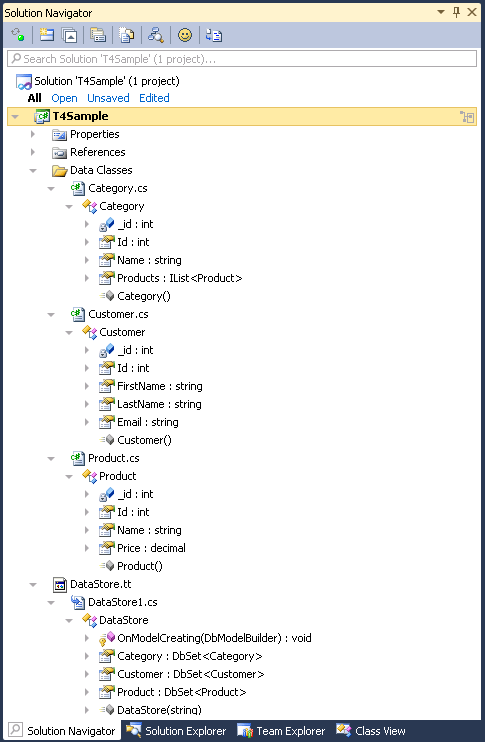
At the end, here’s the generated code and the structure of our solution. Cool, right?
//------------------------------------------------------------------------------
//
// This code was generated from a template.
//
// Manual changes to this file may cause unexpected behavior in your application.
// Manual changes to this file will be overwritten if the code is regenerated.
//
//------------------------------------------------------------------------------

using System.Data.Entity;

namespace T4Sample
{
    public class DataStore : DbContext
    {
        protected override void OnModelCreating(System.Data.Entity.DbModelBuilder modelBuilder)
        {
            modelBuilder.Entity<T4Sample.Data_Classes.Category>().HasKey(e => e.Id);
            modelBuilder.Entity<T4Sample.Data_Classes.Customer>().HasKey(e => e.Id);
            modelBuilder.Entity<T4Sample.Data_Classes.Product>().HasKey(e => e.Id);
        }

        public DbSet<T4Sample.Data_Classes.Category> Category { get; set; }
        public DbSet<T4Sample.Data_Classes.Customer> Customer { get; set; }
        public DbSet<T4Sample.Data_Classes.Product> Product { get; set; }

        public DataStore(string connectionString) : base(connectionString) {}
    }
}
Conclusion
This was a somewhat lengthy article about code generation using T4 templates and code manipulation using Visual Studio automation. Although the scenario in this article is made up, it did show some useful techniques and maybe some starting points for further learning. Also, it shows how powerful T4 templates and Visual Studio automation are and how they can be used in the daily programmers work.
Category: Visual Studio and T4